Thunder: A Modern Handwritten Font for Dynamic Designs
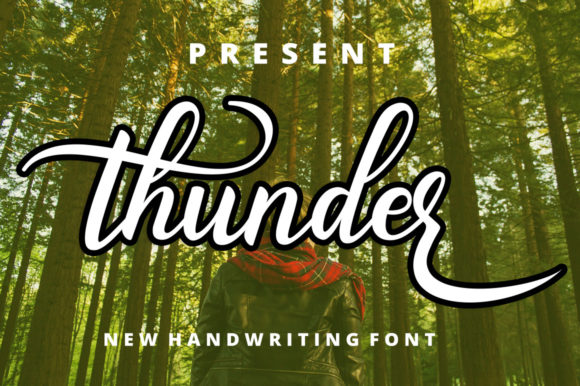
In the world of design, finding a typeface that feels both personal and polished can be a challenge. Many handwritten fonts lean too casual, appearing messy or unprofessional in certain contexts. Others feel overly rigid, losing the authentic charm that makes script fonts so appealing. This is the gap that the Thunder font is designed to fill. It’s a stylish, modern handwritten typeface that strikes a beautiful balance, offering a flowing, connected style with individually crafted characters that maintain a clear, legible form.
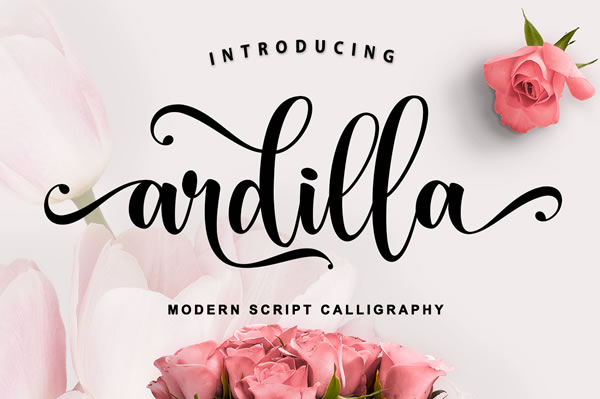
The personality of Thunder is one of confident elegance. Each letter flows into the next with a natural, rhythmic pace, mimicking the fluidity of a skilled hand with a brush or fine-tipped pen. Unlike some script fonts that can feel overly ornate or dated, Thunder’s aesthetic is clean and contemporary. The swashes and alternate glyphs it includes are tasteful, adding a touch of flair without overwhelming the core text. This makes it a remarkably versatile creative font, capable of conveying warmth, sophistication, or modern edge depending on its application and pairing.
Where Thunder Truly Shines: Practical Applications
Understanding a font’s strengths is key to using it effectively. Thunder isn’t a one-size-fits-all typeface, but in the right context, it can elevate a project from ordinary to memorable. Its flowing, connected nature makes it particularly well-suited for specific areas of design.
- Logo Design & Brand Identity: Thunder can serve as the cornerstone of a brand identity for businesses that want to appear approachable yet stylish. Think of a boutique bakery, a wedding planner, a creative studio, or a lifestyle blog. It works beautifully for logotypes, especially when the brand name is short and impactful. The key is to pair it with a simple, clean sans serif font or a timeless serif font for body text to ensure overall readability.
- Editorial & Packaging Design: In editorial design, Thunder is perfect for pull quotes, chapter headings, or magazine covers where you want to draw the reader’s eye. For packaging design, it adds a handcrafted, artisanal feel to product labels, tags, and boxes, especially for items like cosmetics, specialty foods, or handmade goods.
- Digital & Social Media: The font’s modern style translates well to the screen. Use it for impactful headlines on your website, engaging graphics for social media, or stylish email newsletter headers. Its clarity at various sizes makes it a reliable choice for digital applications where quick readability is crucial.
- Personal & Commercial Projects: As a PUA-encoded font, Thunder provides easy access to all its glyphs and swashes, which is a huge advantage for crafters and hobbyists. You can use it seamlessly in design software for personal projects like wedding invitations, greeting cards, or custom prints. For commercial use, always review the licensing to ensure it covers your intended application, whether for a client’s logo design or a product line.
Integrating Thunder into Your Design Workflow
Choosing a font is just the first step. Using it effectively requires thoughtful integration. Here’s how to approach Thunder with a designer’s mindset.
Evaluating Project Fit and Readability
Before you commit, ask yourself: does the tone of Thunder align with the project’s goals? It excels in contexts that call for a human touch, personality, and modern flair. It’s less suited for long paragraphs of body copy or highly technical documents where absolute clarity is paramount. Always test it at the size and in the context it will be used. Set a headline, view it from a normal reading distance, and ensure the flow of the letters doesn’t compromise readability.
Mastering Font Pairing
The true power of a display font like Thunder is unlocked through smart font pairing. Its expressive nature means it needs a more neutral partner to create balance and establish a clear visual hierarchy. A classic pairing strategy is to combine it with a geometric or grotesque sans serif font like Montserrat or Lato for a clean, contemporary feel. Alternatively, pairing it with a sturdy, transitional serif font like Georgia or Times New Roman can create a more traditional, yet still engaging, contrast. The goal is to let Thunder command attention for key phrases while the supporting font handles the detailed information.
Leveraging Included Styles and Alternates
Take time to explore the full character set. The availability of stylistic alternates and swashes means you can customize the look of specific words to better fit your layout. This is particularly useful in logo design or headline creation, where a unique ligature or a swashed terminal can make all the difference. Since it is PUA-encoded, accessing these characters is straightforward in most design applications, making it a practical design asset for both novice and experienced creators.
Considering the Commercial Context
While Thunder is introduced here as a freebie, it’s essential to verify the licensing terms for your specific use. A font that is free for personal use may have different requirements for commercial projects. For entrepreneurs and small business owners, ensuring you have the correct license is a fundamental part of professional practice. This due diligence protects your brand identity and respects the work of the type designer.
Ultimately, Thunder is more than just another handwritten font. It’s a versatile tool that, when used thoughtfully, can inject personality, warmth, and modern sophistication into a wide range of creative work. Its strength lies in its balanced design—flowing enough to feel authentic, yet structured enough to remain professional. By understanding its ideal applications and pairing it wisely, you can leverage Thunder to create designs that truly connect with your audience.